
The tale of backups continues
Some time ago I wrote about backups, my love-hate relationship with most back-up software available, how Duplicati had let me down when it came to rebuilding my database, and I switched to my own solution. Let’s have a look at what happened since then.
My own solution works remarkably well. I thought it was quite fast at first… and I still do. That part of the story is very short — it just worked. I had to get used to starting it rather than just shutting down my computer though. I still had Duplicati running on the side, which ran once per week, or at least, it should.
According to the release notes, some of my grievances were fixed in the latest canary release version, so I gave that a try. That sadly resulted in me having to nurture my backup every time it ran. I do not blame testing versions for being unstable, but it was annoying nonetheless. Generally a repair would fix it. That was until the end of June, when those attempts did not work either:
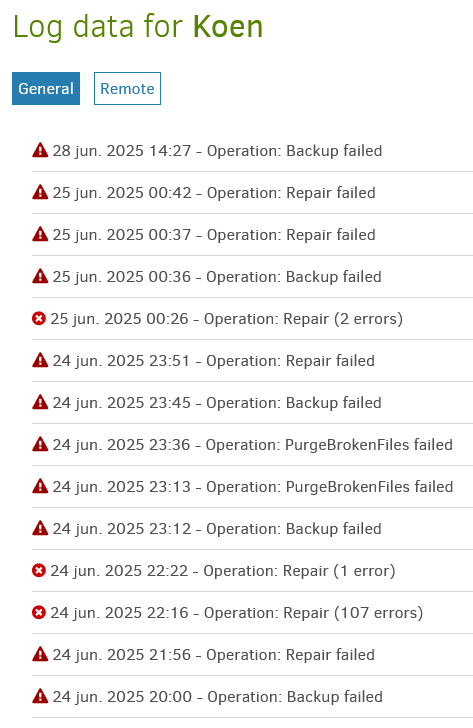
As the dates and time of day also give away, any time I try anything, it takes several minutes before I see the result. Apart from some live logging, what goes on in Duplicati is a black box. That was quite frustrating to work with.
In the meantime, my gripes with backup software had resulted in a suggestion I had seen popping up a few times already: restic with Backrest. Restic seemed very sensible, but the lack of a Windows installer and the heavy reliance on the command line made me wonder if it was the right choice. Luckily Backrest solves that issue by providing a nice web GUI over restic, and an installer for Windows as well. In a way it’s small things, but they were just enough to make me give it a try.
I think this shows both the bad and the beauty with a lot of open source software. The bad is that because, presumably, the developers don’t really want to make a GUI (which, having developed GUIs, is fully understandable), they didn’t. The beauty is that someone else can come along and decide they will just make one. That’s what Backrest in essence is.
Still, none of this helps with discoverability, which admittedly commercial software tends to excel at. Flashy webpages promoting the product that can be installed in one go, rather than some side-project on a GitHub page. Mind you, that’s not critique of Backrest — I just wish I had found it myself. It reminds me a bit of trying to get people on Mastodon. If “How do I sign up for Mastodon?” already does not have a straight-forward answer (well, it’s a federation of servers etc. etc.) you’re going to lose a lot of people, which is a shame, because Mastodon is a great concept, and so is Backrest.
One of the reasons I like a GUI for backups is because I always feel a bit uneasy when configuring them. You only really know whether you did it correctly when you need it, so you can’t really afford mistakes. I have a fire proof safe for important documents, or at least, it was sold as fire proof and I hope it is, because I never tested it. Backups are the same. Also, configuring them that way is a lot easier, as well as monitoring progress. Command lines are great, but for tools like backups or video conversion I still far prefer GUIs (the ffmpeg command line syntax feels like witchcraft).
I started the Restic backup and… it worked. I know that is not a very high bar, but still not something I take for granted. It was rather quick too, admittedly, having Backblaze B2 as a back-end means I can use my entire 1 Gbps upload — hurray for modern internet. It ran for several hours, seemingly everything was going fine. I let it run, and when I came back it showed a non-descript error at 1.88 TiB out of 2.91 TiB. The only real error was a docx file it could not back up because I had it open in Microsoft Word at the time, but that should not prevent the other 1.5 million files from being backed up. Annoying, but I was not ready to give up that fast.
I decided to run it again, maybe it was just a fluke. Sadly that meant another 12+ hours waiting for things to complete. That one however also failed, grmbl grmbl. Because it had not completed a snapshot yet, it would check all files again. It did not need to upload them, but checking the hashes took plenty of time already. In this case another 11 hours, give or take.
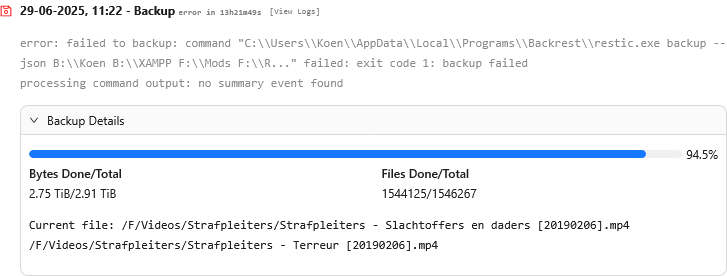
But after that it finally worked — hurray! Because now the first backup was done, every subsequent backup was a lot quicker too. Whereas attempt 3 still took over 11 hours to upload ~300 GB of data, the next run only took 20 minutes. Those times were more reasonable. This was so fast and performant, I might as well run it daily again rather than weekly.
Unrelated to my desktop, but my laptop’s backup also randomly failed. A notification popped up “backup failed”, I clicked on it, and it showed me a window with something along these lines on it:
Backup Failed
Invalid data - SHA1 hash mismatch for file:
duplicity-inc.20130124T230054Z.to.20130201T225108Z.vol1.difftar.gpgCalculated hash: 7726f55012e1e26cc762c9982e7c6c54ca7bb303
Manifest hash: 205ecad0a91f8a11967b70d2d3fbc8e4d06231f5
I really doubt someone like my mother could make heads or tails with this information (apart from the “Backup Failed” part). Even worse, there was only one button: “Close”. Running the backup again resulted in the same error. I could probably somehow fix it, but I decided to just nuke my backup and start over again, it’s small enough for that, but I am still very annoyed that I had to do that. Apart from taking time, for a layperson this is absolutely not set-and-forget.
Anyway, back to my desktop. Now that my backups have been running for a couple weeks, I have next to no complaints. It is still performant. I added Healthchecks.io for monitoring (which Backrest has built-in support for) and that, apart from a few things when setting things up, it worked alright. The scheduling was a bit annoying — it turns out it expects my PC to be on at the time it is scheduled, or else it will just skip it, rather than schedule it whenever my PC turns on. I “fixed” this by setting it to an 18-hours-after-the-last-backup schedule, which does run as soon as the 18 hours are over. This is good enough for what I want to do — run it daily at sometime at the start of the day.
With the new things set up and working, it was time to get rid of the old. I had made a new bucket on Backblaze B2 for the restic backup, so that I could always revert to Duplicati. After a week I figured it was stable enough, plus paying for double the space was not cheap. Turns out you can’t just delete all files, but you can set a policy that removes all files in 24 to 48 hours. With that done, all my Duplicati files were gone. I also uninstalled Duplicati, and removed the database.
I really hope that this ends my backup story, and that it can be “and they backed up happily ever after”. If you don’t hear me moan about this in the future, then assume that this worked out alright :-)