
A tale of backups
I have data. Admittedly most of that data does not have a lot of value, such as a list of motorway mile markers in the Netherlands and their coordinates from 2021. Still, I have no reason to throw it away, thus I just keep it on my disk just in case I ever need it. I have been doing this since the very start, and I still have some of my earliest files. If I lose those files nothing bad would happen per se, but I still would rather not. More than once I have had a hard drive fail on me, so the logical solution is: backups. Backups are something incredibly ubiquitous, yet somehow my — what I consider a fairly common use case — seems to not fit most solutions, so this story is about my search for backup solutions.
I do not like throwing things away. That’s true for real life as well. Anyone who has ever seen my living room knows that I have a simple solution for that in real life: not buying things in the first place. My living room (and house in general) is minimalist, clean, and due to the large amount of flat surfaces sometimes a literal echo chamber. Luckily digital data is much easier to store, and as a consequence I have a lot more things that “might be useful some time”. Additionally, storage capacities have grown more than my data has — the total size of the files of my first computer is several gigabytes, probably small enough for most modern USB drives (not the variety that you get for free with some sort of logo printed on them; those still seem to use the same technology as 15 years ago). I was amazed when I bought my first 1 TB external hard drive, I mean, 1 terabyte! It’s big enough to get its own SI unit prefix! I still have that hard drive, as again I don’t like throwing things away.
My data is thus, really, my data. Files that I somehow collected over the years. It’s a collection of small files (documents, programming projects, configuration files), slightly larger files (photos, art projects), and large files (videos, virtual machines). Nowadays it is about 2.5 TB of things spread over about 1.5 million files. I do not consider that too strange or “a lot”, but we will come back to that later.
My first backups were simply copying files from my computer to an external hard drive. This worked well, except that it got a bit cumbersome after a while. After a long search I settled on SyncBack (Free) to sync my files to my hard drive. I know a second copy does not offer all the capabilities of an incremental backup, but even though I had 1 TB of external hard drive space, I did not have enough space for incremental backups.
When that 1 TB really ran out, I bought a 2 TB hard drive. Another neat feature was that it supports USB 3.0 with a USB B cable (the bulky one). Later I also bought a 3 TB one (with a micro USB 3.0 cable that was so short it was almost comical), as my internal drives became larger and larger as well. I actually still have a picture of what my drives looked like at the time — Bravo, Charlie, and Foxtrot were my internal drives, and Lima, Mike, and November were my external drives for backups.
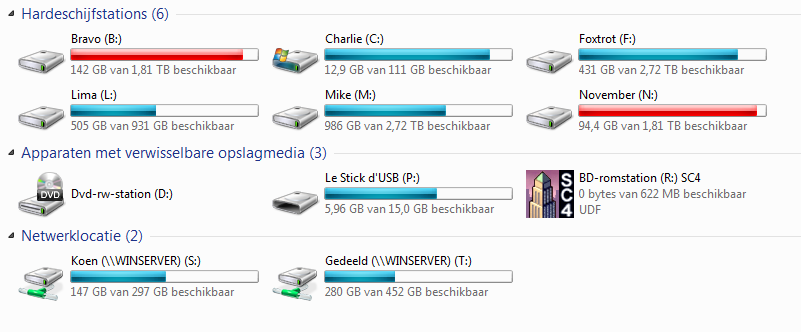
The speed up of USB 3.0 was a nice additional feature, because I had a tendency to start the backup at the end of the day, and I slept in the same room as my computer. That meant trying to sleep with the noise and light of the turned on computer, as I tended to underestimate the time the backup would take. I also would make a backup whenever I thought of it, which was about every two-ish months. That’s fine for most files, but annoyingly the most recent files are generally the ones you want to lose least, and whilst some were on Dropbox, SkyDrive, Google Drive, or whatever cloud service would give me a decent amount of free space, a lot of files were not, so I decided that I needed a better solution.
In 2014 I signed up for CrashPlan Home. I did this after looking at all the other options. One of the reasons I chose them was that the price was reasonable, and they offered unlimited storage. A lot of other options provided storage that even at that time I thought was rather limited — 100 GB did not cut it for me in 2014 either. Another reason I did it then is because we switched from ADSL to cable. Over ADSL we had 0.5 mbit/s up (I still have the speedtest.net history showing that), and over cable that turned into a whopping 10 mbit/s! That was 20 times faster, and more importantly, enough to actually consider an online backup. I selected (at this point around 300 GB) worth of files in the Java-based CrashPlan home application, that would fully redraw itself on every resize and was about as performant as trying to run Windows 11 on an ASUS Eee PC. It was also not very friendly on resources, but hey, it was worth it for the backups.
In 2017 CrashPlan Home stopped, but you could switch to CrashPlan for Small Business for quite a bit more, and get features you definitely don’t need as home user. At least they gave me a discount at the start. Begrudgingly I did that. Slowly my backup there started growing to 500 GB in 2018, 600 GB in 2019, 1.5 TB in 2020 (by that time I still had cable, albeit using a new upload speed of 25 mbit/s, so that took quite some time to upload), and 1.9 TB in 2021. At this point I had fibre and uploading a lot of data was no longer a problem.
In 2022 I finally used the thing that I had paid CrashPlan for all that time: I tried to restore some files after a hard drive had failed. Annoyingly when I did that I ran into some very slow restore speeds, even with my fibre connection. Restoring the 1 TB of files would take between 9 and 30 days(!) on my 1 Gbps fibre connection. According to their support, that was within their expected range — they aimed at being able to restore 30 to 150 GB per day. 30 GB in 2022! Needless to say I was not satisfied with that, so I decided to look for something else. Luckily I also still had the copy on my external hard drives that I could use instead.
After another long search I ended up using Duplicati with Backblaze B2 as back-end. I ended up using Duplicati because it did what I wanted to do, is open source, and seemed reasonably performant (in the context of backup software). I chose Backblaze B2 because of the price, reliability, and the fact they can physically send you a hard drive with your files (as long as you pay for it), which would avoid the situation I had with CrashPlan. Backing up went fine, and restoring went reasonably quickly as well.
Because Backblaze B2 bills based on usage, I was always a bit scared to use my backups. I had been eyeing at replacing it with a Hetzner Storage Box, because it had a fixed price. Sadly my fibre had terrible performance with Hetzner — it was like I was using ADSL again with less that 8 mbit/s speeds. Via some digging I contacted some engineers at my ISP and some engineers at Hetzner about it, and after some rummaging around, even though neither claims to have done something, suddenly it worked properly again - truly a coincidence :-) I decided to just give it a go, and I got a Hetzner Storage Box subscription as well. I had both configured in Duplicati: Hetzner would run daily when I booted up my PC, and Backblaze B2 would run every Tuesday.
For years this worked fine, until a couple of weeks ago my Hetzner backup suddenly no longer worked. My database had somehow gotten corrupt. Basically Duplicati keeps a local database of where files are, also for increments. This is basically a cache, and this database can be recreated from the backup itself. Oh well, I thought, database corrupt: let’s just recreate it from Hetzner. After 5 days it was still recreating the database, and because I was going away for the weekend, I did not just want to leave my computer running. Even though I had tested restoring, I never tested recreating the database, which apparently can take several days or weeks to complete. According to the forums, it might take days if you have “a large backup like 100 GB of small-ish files”. Well great, it’s 2025 and apparently having more than 100 GB of files is still an issue.
Basically once you have more than, let’s say, 500 GB, it seems that backups become difficult. A lot of off-the-shelf backup solutions aimed for normal desktop users don’t really support this amount of data. Backup solutions that do support it seem to be aimed at servers first, specifically Linux — I guess they do not expect people with Windows laptops and desktops to have some files they don’t want to lose. Duplicati was one of the few with a Windows installer. It also seems that the focus of a lot of backup solutions is quite different than what I care about. They boast about compression, data deduplication, etc., but frankly: if I decide to have the same file twice on my hard drive, then I don’t mind it ending up in my backup twice either, especially if that means I can do a restore in hours rather than days or weeks. I had plenty of time to look into alternatives as my database was slowly being recreated in the background.
Admittedly because I spent quite some time searching last time round as well, I quickly decided to give up on trying to find something that does what I want out of the box, and I decided to build something myself. Rather than wait for the backup to be recreated, I decided to get rid of it, the irony of fibre being that reuploading 2 TB of data was quicker than recreating the database. As much as making my own backup thing scares me, at least it would have no surprises. In the end I ended up scripting something around rclone. It is just a synchronisation of my files, no versioning or “advanced” backup technology. What I realised is that all the day-to-day versioning is nice to have, but not essential, whereas quick recovery of files in case of disaster is important to me, and something that a lot of backup solutions don’t seem to care about. I keep the versioning with the Backblaze B2 backup, that I keep using Duplicati for, because I want a backup for my backup, but I decided to move Hetzner to just a copy of my files. The only extra step I took is that rclone encrypts the files before they are uploaded.
The end result is just a simple script that calls rclone a couple of times for different folders. It can do a normal run in about 30 minutes for all my files, and in that process it also checks all remote files for integrity. This is quite a bit better than I had with Duplicati, which would take about 45 minutes.
This system worked really rather well - backups were relatively performant, and so were restores. There were still two open issues: monitoring and scheduling. Duplicati ran at startup. My solution did not have anything like that — it was just a command line prompt when it was running. I was visiting a friend who had a solution so simple I don’t quite understand how I did not come up with it myself earlier: I modified the script to make it shut down my computer after it was done. Then I could just execute the script before shutting down for the day, which had the additional advantage that the performance of my machine would not be impacted as was previously the case with the backup running when my computer booted up. At this point I was no longer sleeping in the same room as my computer, so that was no longer an issue. That was the scheduling part done.
Duplicati’s system tray icon would tell me if something was awry, and of course my solution does not have that, so I needed monitoring. I settled on the beautifully simple Healthchecks. I modified the script to curl a specific URL. If that does not happen for three days, I will get an alert via email and as a notification on my phone. Basically enough to tell me to remind me to look at my backups. This seems to be working well so far, and I’m really quite happy with the current setup. I added a small check to see if the rclone log contains “ERROR”, and if it does, it signals to Healthchecks that the last run ended with a failure. I get notified about that, which is great.
All in all I think that, for now at least, my backup situation is sorted. What still irks me however is that even in 2025 my backup is considered large by most software and platforms. A million files and 2 TB of data should not be an issue. Additionally, none of the things I found and tried were simple and intuitive. I have always pressed the importance of backups, also to friends and families, but it does leave a slightly bitter taste that I can’t just tell them “install this thing and you’re done”. All of them need configuration and more knowledge of the internals than I would like.
Duplicati definitely belongs to this category, where half of the things require looking at the logs or using the “command line interface” (which is a web page that makes commands, it’s an interesting thing that manages to confuse both command line users and web users). My own rclone scripting is definitely not beginner friendly. The ones that are beginner friendly expect you to have basically no files, or a second hard drive, or anything that is not “some files in C:\Users”.
So far the most simple desktop end-user back-up solution I have come across is Déjà Dup, which uses Duplicity under the hood (but that is not important) and is shipped with Ubuntu by default. It gets a long way there, but still, it has its own issues that make it not quite as smooth as it in my opinion should be. The main issue I have run into is that it sometimes creates another snapshot (which is fine), and because a snapshot basically adds all files anew to the cloud storage, that runs out of space. The fact cloud storage can run out of space seems to be a case not considered by the developers, and I get an unhelpful “403 Forbidden” error pop-up. I can, by a bit of looking, deduce that it has run out of space. Sure, increasing the amount of cloud storage is the simple solution if that’s available, but a bit more control over when to make a snapshot and how much space to use for it, as well as some detection to prevent it from running out of space in the first place, and then reporting that that is what is happening would be nice for laypeople. Additionally, when you try to restore files it takes ages - I spent an hour restoring a single file via Déjà Dup, all the time a loading spinner shows giving you no idea of how long it’s going to take (or whether it’s still doing something in the first place). And this is a small-ish, 100 GB backup of my work laptop. Sigh.
It seems all backup software has its problems. Maybe I will create my own backup solution in the future with its own unique set of different problems - I have, for example, always found it strange how incremental backups pile mutation on mutation on top of an old backup, making recovering the most recent version (which is the one I want most of the time) the most processing power intensive, rather than doing it the other way around, but maybe I will explore that later. At least right now my data is backed up, secure, and available, so that hopefully when I turn 80, and many drives have failed me in between, I can still access my list of motorway mile markers from 2021.