
Building a custom HUD for Dakar Desert Rally
This is a story about Dakar Desert Rally, a game I have a love-hate relationship with. It’s not the first time I write about this game, I previously showed the printed roadbooks I made for Dakar 18 (its predecessor) and Dakar Desert Rally. This time it is about the game modding I have done to get an external dashboard for Dakar Desert Rally working, because I found another niche game which is basically abandoned. As I did not find many articles online on how to do this, I figured I might as well write down why and how I did it.
Let’s start with why I have a love-hate relationship with Dakar Desert Rally, as it explains a lot of the things I do for it. Dakar Desert Rally is in my opinion the best rally raid simulation game currently available. That is not giving it a lot of praise, because there is not a lot of competition. There is Big Run from 1989, Paris-Dakar Rally from 2001, and Dakar 2 from 2003. Then there was nothing for a long time (presumably also due to the declining interest in Dakar, health and safety and all that, because looking back at 90s Dakar that was really quite something) and then Dakar 18 came out in 2018.
The problem with both Dakar 18 and Dakar Desert Rally is that they try to appeal to hardcore Dakar fans and more casual players, but in the process fall short for either. The navigation is too difficult for casual players, as you need to learn how to read a Dakar roadbook, and that is non-trivial. There are many initially unintuitive symbols, and most acronyms are in French (e.g. HP for “Hors Piste”, meaning “leave the track”, or E3 for “Etroit”, meaning “narrow”). The game has a built-in lexicon, but it does not hold your hand and instead throws you into the deep end. The navigator is too unreliable to fully trust them to guide you where to go. Sure, Dakar Desert Rally introduced a “sport” mode, but that had next to nothing to do with the real Dakar, and even as an arcade player it just was not very fun.
As a more simulator person I don’t mind the navigation part, in fact, it’s one of my favourite parts of Dakar. My complaints are that, as someone with a simulation set up in my living room, the car handling leaves much to be desired. It feels unintuitive and unresponsive, and the force feedback is unhelpful. Also, having a career mode where simulation mode is locked by default and requires level 25 to be unlocked, and a stage only counting as completed when you finish in a certain position make sense in an arcade game, but for a simulator that feels incredibly odd. It did not help that the AI is very unreliable in performance. Every time a simulator tried to force that (e.g. rFactor, or now Assetto Corsa EVO), the community response has been negative. Lastly, the game does not support any form of telemetry, which would allow third-party apps to read things like current speed, gear, etc. from the game. Normally I use an old smartphone mounted behind my wheel to display this kind of information.
The fact the game appealed to neither, as well as the game being released in a very broken state (which has never been fully resolved, it is not uncommon to get a “fatal error” when loading a stage) meant it was a bit of a flop. Bad reviews, low sales. Development has since halted. I do not expect that there will be someone making a Dakar simulator title any time soon, as it is even more niche than rally simulators, and those are already a rare breed. This is why I have a love-hate relationship with Dakar Desert Rally — but rather than just grumble, I wanted to see if I could make things better.
Whilst it is a shame that Dakar Desert Rally is not going to be updated any more, it also is an opportunity. If I modify the game, then it won’t break in the next release, because there won’t be a next release. I have reverse engineered a lot of things over time, and things randomly breaking was definitely one of my least favourite parts, especially as it always happens at the least opportune times.
Dakar has a general speed limit. 170 km/h for cars, 140 km/h for trucks. Turns out the no speed limit drag race style from the 80s and 90s was too dangerous, which frankly makes sense. For context, here is a by now famous clip from 80s where Jan de Rooy in the DAF truck overtakes Ari Vatanen in the Peugeot, who was then leader of the car class. In that same year another DAF truck would crash — the navigator would not survive the incident, and the driver would end up with severe injuries. Andere Tijden made a documentary about this (in Dutch).
This speed limit makes sense, and is also enforced in the game (but only in simulation mode). In real life cars nowadays tend to have an electronic limiter, but that is not available in the game. The game is also really harsh, immediately penalising you for speeding. The current speed is shown conveniently behind the rim of my wheel, meaning I can’t really see it. The text is also quite small, as is the warning.
Basically I was trying constantly watch what my speed was in an awkward way, only to often fail and accidentally speed (which is easily done when watching your heading, figuring out where to go next, not hitting rocks, and trying to stay below 170 km/h). It’s like going for a nice hike with a stone stuck in your shoe — it’s a small thing but it does sour the experience. If you look closely, you can see the HUD (but not the speed) underneath the rim of the wheel on the screen. Compare that to the very large number on the phone, and I think it is clear why I wanted that instead.
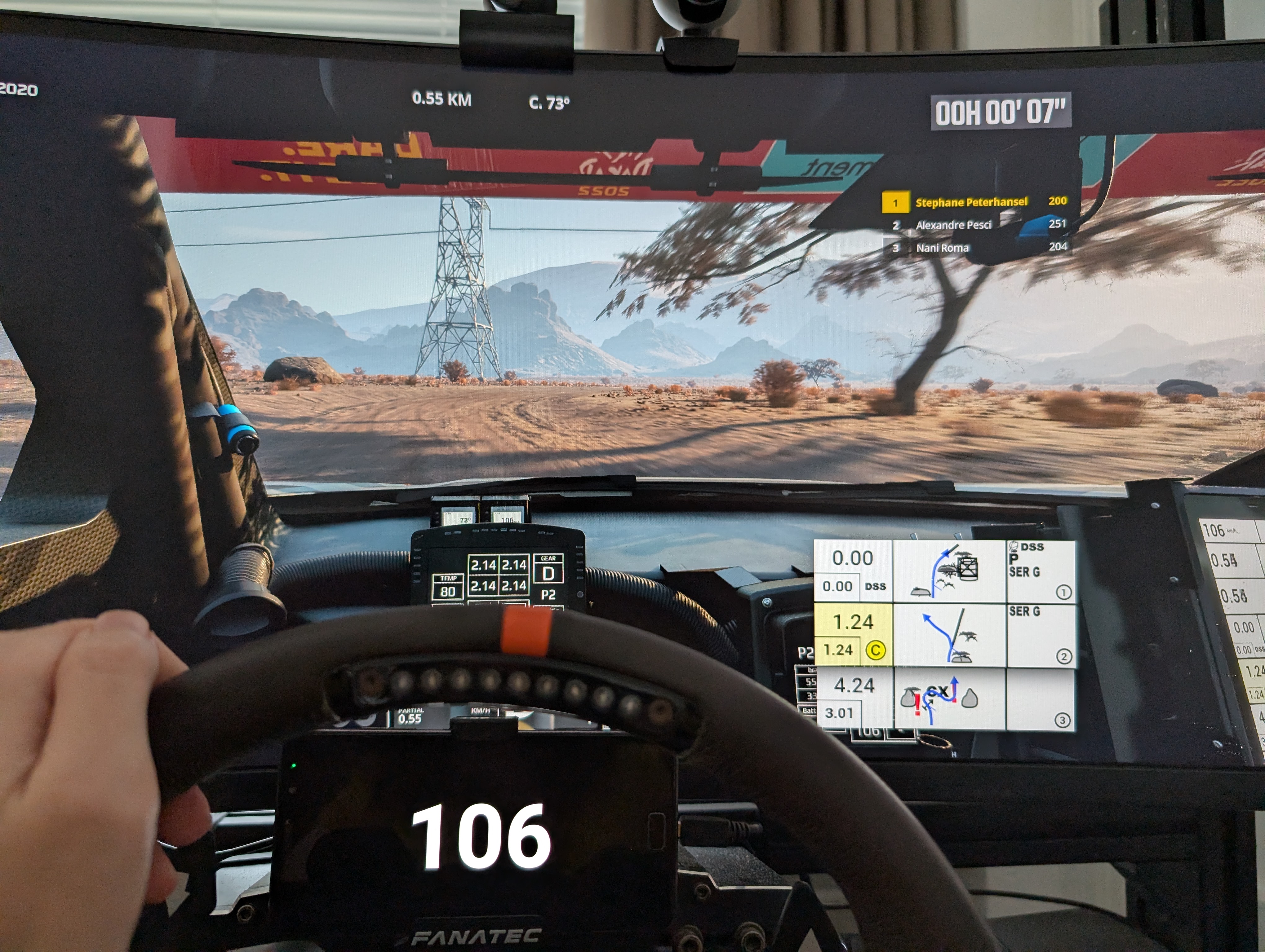
I had been contemplating making something to show the speed on my dashboard for quite some time. When I made the physical roadbook for Dakar Desert Rally, I had already looked into whether I could somehow extract things from the game. When that did not work out, I made a system that would systematically take a screenshot, cut out the roadbook notes, and move the roadbook along. Already then I had the idea of doing that with the HUD as well, extracting the number from the image, and sending that to my phone somehow. I never ended up doing that, though it would probably work.
Recently my interest in Dakar Desert Rally piqued again (and I am not sure why), and this annoyance popped up again. I did find something that claims to add telemetry to Dakar Desert Rally (among other games) on GitHub, but I never got that working. Given that it was now clear that there were not going to be updates, I thought “maybe I can somehow extract this from memory”.
I had not a lot of experience with this kind of low-level memory access reading, but I figured I might as well give it a shot. One of the first realisations was that there is not a lot of technical difference between a trainer (something to inject something into a game) and what I was trying to do. Both try to find the correct memory address and then do something with it, the only difference is whether that’s reading or writing to it.
To modify values in the game, I had used Cheat Engine before to unlock simulation mode early in Dakar Desert Rally, so that’s where this quest started. It has an unfortunate name, because whilst cheating is one of the things you can use it for, it allows for far more tinkering with games. It is also quite low-level, as it basically edits raw memory values.
In order to read a specific variable (e.g. speed), you first need to know at which address it lives. The tactic to find this is quite simple: start the game, connect Cheat Engine to the game, start a stage, drive a bit and remember the current speed, pause the game and look in memory for a value the same as the current speed. I guessed that the current speed would probably be a 4-byte integer. That resulted in many memory addresses that matched that value, because even if my speed is 106 km/h, other things might also have a value of 106. Then I changed my speed, and scanned those addresses again for the new speed. Repeat that a couple of times, and in the end only one address that seems to represent the speed, because how likely is it to have a variable that happens to always have the value of the current speed?
The problem is that this address changes every time a stage is loaded. What we actually need is a pointer to that address that is static, or a pointer to a pointer to that address, or a pointer to a pointer to a pointer to that address — you get the idea. Luckily Cheat Engine has tooling for this built-in. It can create a pointer map for a certain address, showing all pointer paths (up to a certain length) to that address. I can then restart the stage, find the new address for the speed by repeating the previous step, and looking for a pointer path in the previous set that now refers to the new address. Those paths contain offsets to the next pointer. What that means is “Start at address A, go X bytes down, then go to that address, go Y bytes down, …”, you get the idea. And voila, we have a reliable way to get the address that the speed lives on. This is also the reason why this would break if the game is ever updated, as those paths would change.
Luckily someone on the internet already made an open source trainer for Dakar Desert Rally (among other games). Their trainer removes the speed limits — seems I am not the only one annoyed by them, though they chose a different solution. Their trainer basically does what I described above, plus some scaffolding like getting the pointer to the game, etc. I would recommend reading their source code — it makes sense once you can wrap your head around it. Plus I was happy I did not need to reinvent the wheel. The only change I needed to make was the new memory path (which, in case you are interested, is [0x5D02198, 0x3F0, 0x10, 0x3F0, 0x670, 0x2E0] for the current speed), and rather than write a value to it, read from it. This is that code:
public class CurrentSpeed: BaseCheat {

    private static readonly int[] CURRENT_SPEED_OFFSETS = [0x5D02198, 0x3F0, 0x10, 0x3F0, 0x670, 0x2E0];
    private static readonly int[] SPEED_LIMIT_OFFSETS = [0x5854580, 0x10, 0xF0, 0x30C];
    private static readonly int[] GEAR_OFFSETS = [0x05D02198, 0x3F0, 0x10, 0x3F0, 0x670, 0x2CC];

    public override string name { get; } = "Speed telemetry";

    public override Combination keyboardShortcut { get; } = Combination.TriggeredBy(Keys.T).Control().Alt();

    protected override void apply(ProcessHandle processHandle, string gameVersionCode) {
        IndirectMemoryAddress currentSpeedAddresses = new(processHandle, null, CURRENT_SPEED_OFFSETS);
        var currentSpeed = MemoryEditor.readFromProcessMemory<Int32>(processHandle, currentSpeedAddresses);

        IndirectMemoryAddress speedLimitOffsets = new(processHandle, null, SPEED_LIMIT_OFFSETS);
        var speedLimit = MemoryEditor.readFromProcessMemory<Int32>(processHandle, speedLimitOffsets);

        //IndirectMemoryAddress gearOffsets = new(processHandle, null, GEAR_OFFSETS);
        //var gear = MemoryEditor.readFromProcessMemory<Int32>(processHandle, gearOffsets);
        var gear = 0;

        var ipAddress = "192.168.1.37";
        var client = new UdpClient();
        IPEndPoint ep = new IPEndPoint(IPAddress.Parse(ipAddress), 4445);
        client.Connect(ep);
        var data = new byte[256];
        data[0] = (byte)currentSpeed;
        data[1] = (byte)(currentSpeed >> 8);
        data[2] = (byte)(currentSpeed >> 0x10);
        data[3] = (byte)(currentSpeed >> 0x18);
        data[4] = (byte)speedLimit;
        data[5] = (byte)(speedLimit >> 8);
        data[6] = (byte)(speedLimit >> 0x10);
        data[7] = (byte)(speedLimit >> 0x18);
        data[8] = (byte)gear;
        data[9] = (byte)(gear >> 8);
        data[10] = (byte)(gear >> 0x10);
        data[11] = (byte)(gear >> 0x18);
        client.Send(data, 256);
    }

}
I could now read the value from memory, but I still needed the dashboard. Years prior I worked on a dashboard for one of the older WRC games. In that game I ran into the issue that I could not see which gear I was in, which, using the sequential gearbox, sometimes resulted in me shifting down to neutral. That game also did not support telemetry output, or at least not at the time. Back then I solved it in a game-agnostic way. The only time a gear changes is when I hit the button for gear up or gear down. I made a program that would listen for those buttons, and keep its own state of the current gear. That would then be sent over a UDP to an Android app where I would display the number. Quite simple, although it did require me to make sure the gears matched up when I started a new stage, as well as set up the maximum number of gears correctly (as shifting up from top gear means you stay in top gear, and shifting down from reverse means you stay in reverse). I figured I could reuse this project to show my current speed. This helped with all the things like keeping the screen of my phone on, removing the menu bar, etc., all small things that together are quite nice not having to do twice.
One thing both of these have in common as well is that I in principle made them for me and only for me. With things I publish online, I make sure they are a bit more polished, and that they work for others as well. That requires things like a configuration file, a nice icon, it working on different screen sizes, etc. Right now things like IP addresses are just hardcoded — if I need to change them I can just recompile everything. Given the Dakar Desert Rally player base of several dozen players, making it universal might not be worth the effort. Though if you do want this for yourself, feel free to message me.
The open source trainer came with an UI — I did not need one, but no need to throw it away either, so I just reused that. The nice thing about UDP is that I do not need to keep state on the sending side, which made it far easier to integrate. Whenever it reads the value from memory, it sends it to the phone. That is probably far more frequent than necessary, and could probably be made far more efficient, but it works fine, and my PC and phone can handle it just fine.
Whilst making this work I did run into the fact that C#, the language the server is in, and Java, the language the Android app is in, do not use the same byte order for integers (technically C# has a variable byte order based on the machine it is compiled on, but if you can find me a big endian Windows machine let me know). Luckily turning that around is not too difficult, though programming in those two languages simultaneously is quite tricky — I often found myself using the wrong functions that would exist in the other language but not in the language I was currently working in. The UDP protocol itself is quite a simple one — for WRC I sent one byte with the current gear. For Dakar Desert Rally, I changed that to four bytes with the current speed. Could hardly be simpler, though I guess technically one byte would suffice for the speed, as it is unlikely to get above 255 km/h anyway.
That was working fairly quickly, but I was not done yet: I wanted to display more than just a number — I also wanted warnings when nearly speeding and actually speeding. The game makes the warning banner yellow when within 20 km/h of the speed limit, and red when over the speed limit. Since the trainer already had the address where the speed limit lived (as it would overwrite that value), I could just read that value and send it as another four bytes. Then I could do the checks (and change the display) on the phone side.
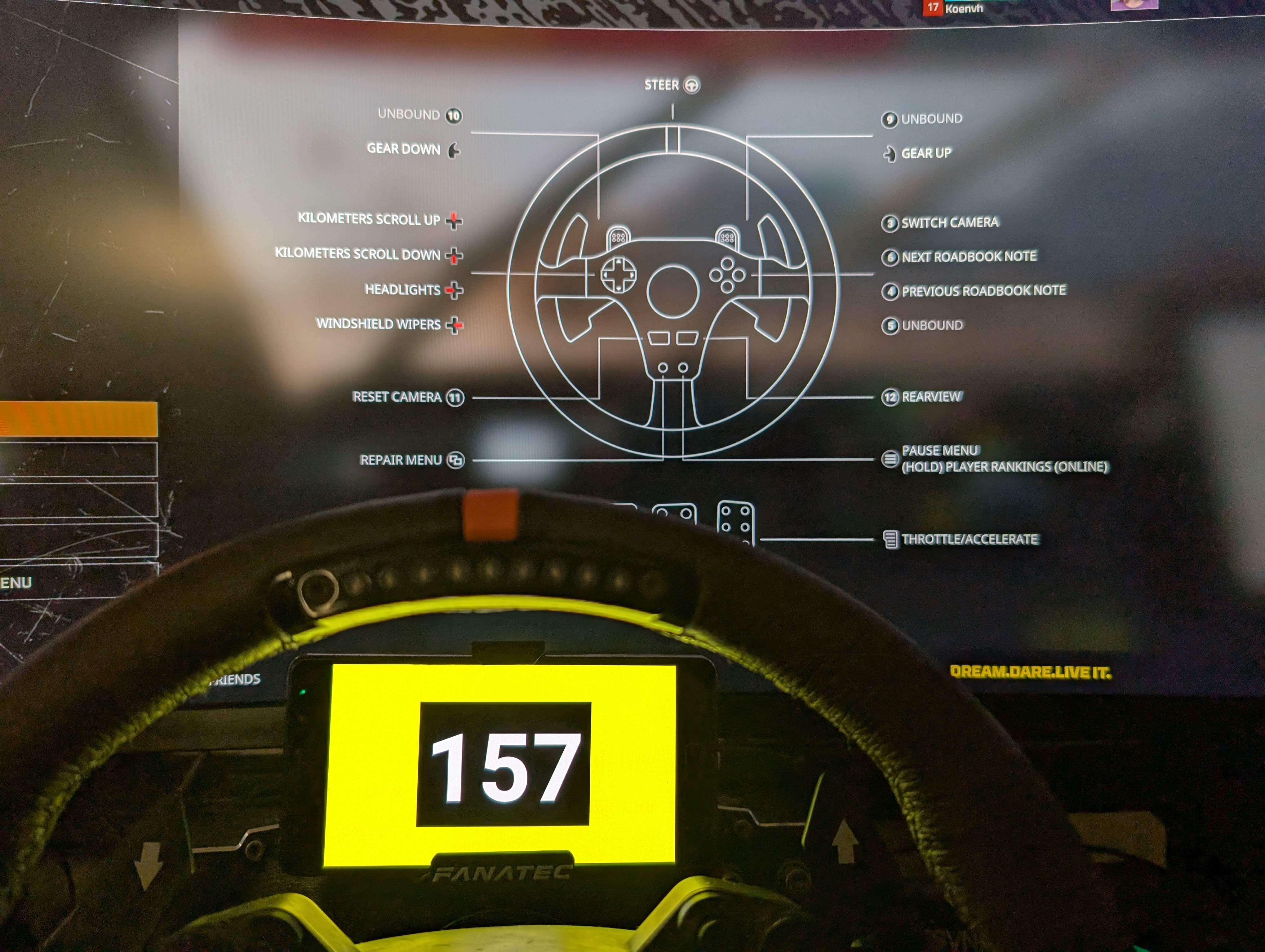
Initially I changed the text colour just like the game, although with an additional orange when within 10 km/h of the speed limit. This worked but was not really clear. I later changed it so that the background would change in colour rather than the number, and that it would flash red when speeding (rather than just a solid colour). That was a lot clearer. The flashing red was a simple idea, but surprisingly that is the thing that took far longer than getting the number to display. I always find it funny how things that seem simple can take a lot longer than things that seem difficult. Sadly there is no built-in blink feature in Android, or luckily, depending on how you look at it.
It also turned out that I was quite lucky with how easy it was to find the value for the current speed in memory. I tried to add the current gear indicator as well after that, and rather than one address holding the current gear, apparently many addresses hold the current gear. Some of these addresses are car-dependent too — it’s quite a mess, which given the game does not surprise me. I found out one of the addresses is only used by the HUD. By disabling the HUD during the check, one of the values freezes whilst the other keep changing with the gear changes. This would tie the phone dashboard to the HUD being active, but at least it would work for all vehicles. That was not an issue though, as I also found out that way that the address I use for the current speed also depends on the HUD being turned on. If you’re wondering “but I do not see the current gear in your picture”, you would be right: I don’t know where to put it yet, and in practice I do not really miss it.
I posted this to my social media (which is one of the reasons I am writing this blog post), to the Dakar Desert Rally Discord server, as well as to Reddit. The Discord and Reddit responses sum up the game quite well: it’s mostly quiet, some people saying “I would play this game if X”, and a few hardcore fans, and quite a few people on the fence. This is a video of the “final” version, with me driving a truck. I am still in two minds about releasing this dashboard, but at least I managed to fix a gripe for myself. If anything, I have a new tool in my toolset for tinkering with games.