
What you can (but shouldn't) do with rsync
rsync is quite an amazing tool to sync files from one location to another remote location, and that for nearly 30 years. Just to be clear, this article is not trying to bash rsync (or /bin/bash rsync for that matter). No, rather it’s a display of how versatile rsync really is… along with the question of whether that versatility makes it a good idea to use it for critical internet infrastructure.
Ever since I started working on RPKI-related things (which uses rsync as its primary URI scheme and transfer protocol) I have been intrigued by rsync. The Resource Public Key Infrastructure (RPKI) is an infrastructure to make cryptographically verifiable statements about internet resources. So think certificates that contain a block of IP addresses or an AS number, and then sign some sort of statement. RPKI is an open standard. rsync is not really an open standard, it’s a program that has its own protocol, which acts as reference implementation. It’s nearly 30-year-old C code which is not the easiest to read. There are some other (partial) implementations, including some commercial ones, but for all intents and purposes there is one rsync. rsync has multiple operating modes, one of the most common ones is that you can use rsync over SSH. RPKI does not do that — it uses rsync where one side is in daemon mode, and any client can connect to it and download from it. That mode has been my focus, and for some reason that mode is generally not implemented in other implementations. I’ll be calling them server and client, but technically they are sender and receiver, as the protocol is bidirectional, but setting up a public rsync daemon that is writeable is not a great idea :-)
rsync heavily relies on the assumption that neither of the two sides tries to fool the other side. That makes sense if you control both sides. In the RPKI, that is not an assumption you can make, otherwise we could just as well not do the certificate shenanigans.
Anyway, without further ado, let’s show what you can do with rsync. Rsync allows you to print arbitrary text (as long as your characters are not before space in the ASCII table, except carriage return and newline, which are allowed at the end of the message), e.g. via the message of the day (MOTD) or just as an “error” response. This means you can play Bad Apple on rsync:
As you can see it is quite choppy at times — that’s because I can’t clear the screen (because that’s an ASCII character before the space), and every line is its own message (as a newline can only appear at the end of the message). Even with those limitations, you can still channel your inner Neo from the Matrix:
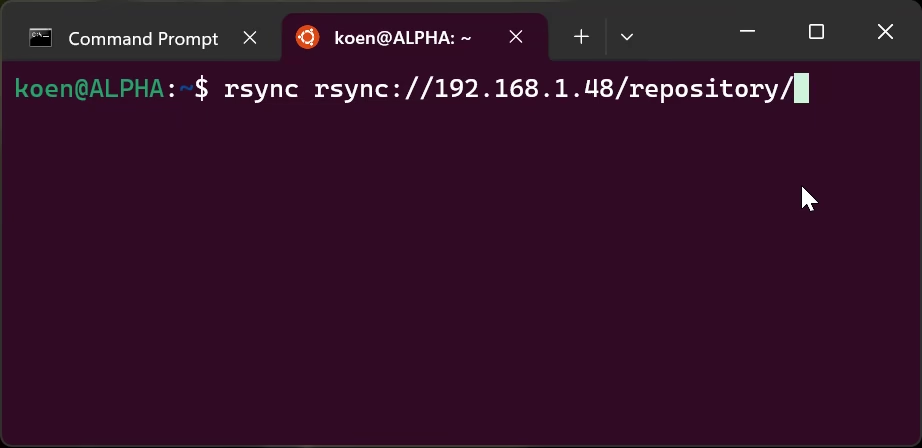
The MOTD is always downloaded. You can pass --no-motd to tell rsync to not display it, but it will be downloaded. There is no size limit to your MOTD, although on the receiving end it will be stored in memory. You could send the entirety of Wikipedia as MOTD, but then the client will probably run out of memory and crash.
Don’t worry, the rsync client can be mean to the server too. One of the things the rsync client can send are filters, which tell the server which files to include or not to include. The server does the filtering (or not, it’s more of a “could you please” rather than “you must”) by checking all your filters for all the files. There is no maximum number of filters, you could endlessly keep sending filters as well, and they will all be stored in memory — until the server runs out of memory.
The server could of course ignore your filters entirely. Actually, all filters are completely optional. If the server wants, it could just return whatever files it wants, even if you tell it to e.g. not include files over 1 GB, or ending in “.mp4”, etc. etc. The server could also serve so many files your system runs out of inodes without you really being able to do something about it, as there are no options in the default client to prevent that. Though I guess you could use a filesystem without inode limit like XFS… or NTFS if you are feeling adventurous :-)
That is of course if you get the files in the first place. You could open a connection, leave it open, open another one, and another one… A DDoS is not necessary, with ~300 simultaneous connections you can take down pretty much any rsync server, which you could do from a Raspberry Pi. Just make sure to feed data very very slowly.
In summary you can make the client run out of disk space and memory, and you can make the server run out of memory and open connections. But wait there’s more! For a long time you could write outside the destination path provided by rsync, either by using ../../../etc/passwd in the file name or by making a symlink to outside the path. Both of those are fixed in the latest version (v3.4.1), which is likely not the version your Linux distribution gives you, and where one of those is likely still present.
All in all, rsync is very versatile, for good and for worse. It’s a great tool to sync files from place A to B, though maybe not the best choice to base your critical internet infrastructure on. But that’s what was picked for RPKI, and it seems we will be stuck with it for the foreseeable time, so rather than moan about it, let’s share the joy! I felt bad for all the DNS people having to miss out on the joy of working with rsync, so I made a DNS resolver over rsync just before Christmas. Feel free to try it out rsync rsync://thuis.koenvanhove.nl/A/koenvh.nl/.
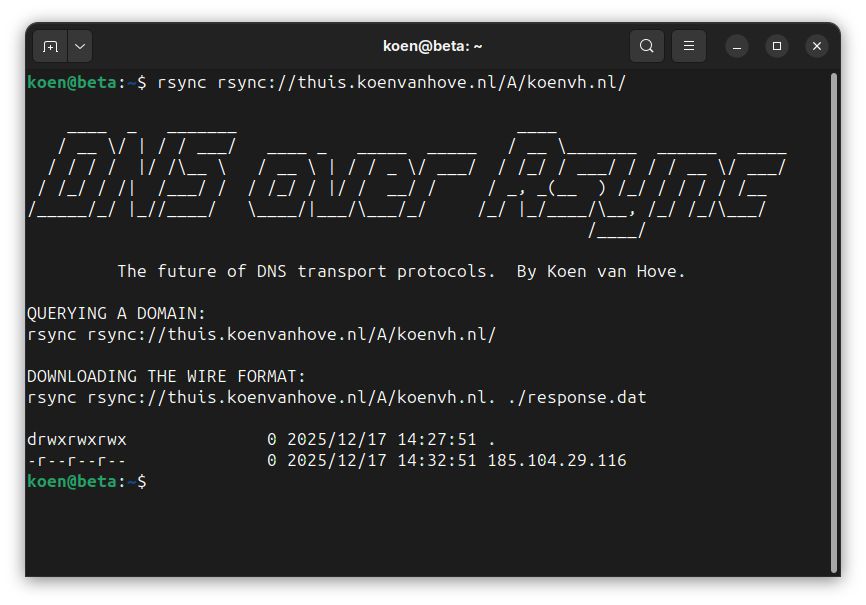
The records appear as files, and the time is set to when the TTL will expire. Maybe in the future I will encode the flags in the file permissions. Most of the DNS people who saw it were horrified, which I take as a badge of honour :-)