
Weird clocks and historic time
I've always liked giving a slight twist to everyday objects, and clocks are no exception. Seeing the time is so ubiquitous that it's hardly something you ever think about. This post is about two interesting clocks I made. Admittedly they're more art pieces and I doubt you'd want to use them for your day-to-day life.
The first one shows some (interesting) history facts. Time (in most of the world) is expressed as hours and minutes, generally using 24 hours, like 17:52. Years are generally expressed as a number from 1 and 2026 (at the moment of writing). I was wondering: what if I took the time, e.g. 17:52, and turned it into the year 1752, and would then display an event that happened in 1752?
I know the US, UK, and some other places have a tendency to use AM and PM. AM and PM is a strange system, that, as someone who likes logic, is really annoying to implement. Ever noticed how it starts at 12 AM, then goes to 1 AM up to 11 AM, and then switches to 12 PM? Ironically in this case AM and PM would make this clock easier. The reason is that the years up to 1259 have already past, but everything after 2026 is still the future. This causes my watch to show no facts for over three hours per day, which is a bit of a shame. By the way, the years start at 1, not 0, hence the start of the new millennium was technically 2001 and not 2000, which means I have no facts for 0:00 either. With AM and PM that time does not exist, as it would be 12:00 AM.
Anyway, it's a shame to ignore history past the Middle Ages, so I still went with 24 hours. To get the events, I used Wikipedia's year overview pages, which have a nice short summary for the main events for each year. Thank you Wikipedia volunteers! Parsing that data is slightly annoying, but eventually I had all the data I needed to display some facts for every year. Fixing the occasional errors was simple enough. I used the Dutch Wikipedia - the format for every country is different (and dependent on who maintains it) - so it would take some effort to adopt this to other languages. I also still don't quite know what to do after 20:26. I contemplated using data from BC, but in the end decided against it.
As an aside: Japan has the interesting system where you can go past 24 hours, e.g. 25:30. These times you would be able to find in e.g. a TV guide, meaning it's at 1:30 AM the following day. I think that's quite nifty, because internally a lot of people treat today as "before I go to bed" and tomorrow as "when I wake up".
I made this before I had a smartwatch (or well, a functioning one. I have a first generation Pebble with a broken screen and an ASUS ZenWatch 2 with a battery life now measured in minutes). Initially I wanted to turn this into a wall clock using an e-ink display, but doing that with a font size that is actually useful turned out to be quite tricky. I did turn it into a web page. I had written off the idea of using a smartwatch because in my mind they were still quite expensive, but it turns out a second hand Samsung Galaxy Watch4 (which is the one shown above) is actually quite cheap and still supported. I'm quite impressed by that.
The second idea for a clock came from something that has been a quirk of mine for quite some time: I have the tendency to say "good morning" as if it were "good day". I can say "good morning" regardless of the time of day (although I'm now aware of that, so it tends to be "good ... ... ... ... afternoon", during which I try to figure out what time it actually is). There are many ways to solve that, like picking a different greeting or remembering whether it's morning, afternoon, or evening. Those are all sensible. What I could also do is make a watch that always shows 11 AM, so it's always good morning! Every hour the time zone changes to where it is, at that moment, 11 AM in the world. I will freely admit that this is not the most straight-forward solution to this problem, but it is definitely a solution:
I'm quite pleased with how they turned out. As always I posted them online, and definitely the second one gained quite a bit of popularity. I think it not being Dutch helps with that too. I have been using it for a couple of days, and even though I know how it works, I still get confused when I see that it is 11 AM.
Wear OS's format for making watch faces is really limited. For the historic events I barely managed to make it work using a very, very long chained ternary expression that just checks what hour and minute it is. Due to the complexity of time zones, daylight savings time, etc., that would not work for this one. In the end I caved and pre-generated all the time zones for the next 25 years. Hopefully that is enough. They are random in case there is more than one matching time zone, so the time zone for 15 UTC today might be different from 15 UTC tomorrow. I did filter out all the time zones that are not a full hour offset from UTC, like India and Newfoundland - having to work with a 30 minute offset would make this even more cumbersome.
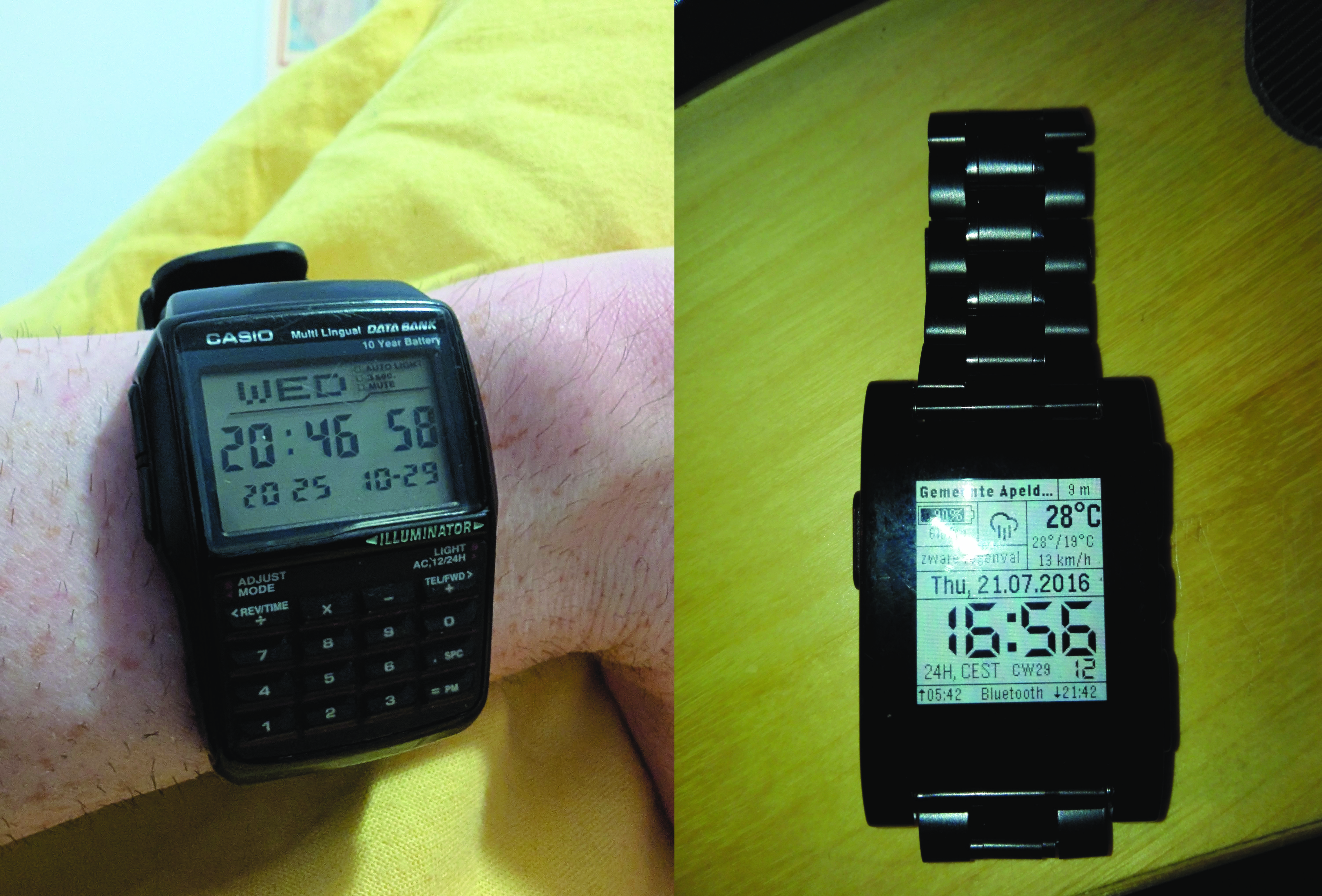
The fun side-effect of these projects is that I have a working smartwatch again. My first smartwatch was the original Pebble, which I loved. Time, date, weather, location, sunrise and sunset, all on the main (and very busy) screen. I still think that due to all the limitations of the original Pebble that it was, ironically, the best user interface design for a smartwatch. Touch screens on smartwatches don't really work well, they feel fiddly and unintuitive. Wear OS handles too much like a phone, which it is not. I find myself swiping through an overfilled app drawer with things I cannot remove to find the one thing you need, at which point I often think "I might as well get my phone". Also, I needed to make sure my watch face was not using too many active pixels to save battery life - all things I did not need to take into account with my Pebble which easily lasted a day.
There is however one thing that is quite cool with my new smartwatch: Google Assistant actually works decently now. I can talk to my watch like Inspector Gadget and it will actually do things. Go go gadget turn the lights off. I must admit I rarely use this functionality, though younger me would have been ecstatic.
Do I actually use these two watch faces in real life? Yes, though mostly as a gimmick for showing others. For when I actually want a watch to know the time I mostly use my old watch, which is a Casio DBC-32-1A. I only really use it for the time and date, but of course I bought it because it has a numpad. Teachers used to say "you aren't always going to have a calculator in your pocket", which was the reason I bought this watch, because it is also a calculator. Unlike all the smartwatches, this one has been going strong for well over 10 years now (the battery actually lasts 10 years like it claims!). It technically has a phone book and some other gizmos, but much like all the settings on a toaster you're never actually going to use them.
Anyway, that is all I have time for (pun intended). I made two clocks that hopefully make you go "huh, that's interesting". In case you are curious, both watch faces are available on GitHub: https://github.com/Koenvh1/HistorischHorloge and https://github.com/Koenvh1/Its11AM. I have tried uploading the historic time one to Google Play, but my submission keeps getting rejected, and frankly the entire process is such a faff that I can't be bothered, so I'm afraid you will have to "compile" it yourself (it's not really compiling since the watch face format is effectively just an XML file, which makes this entire process even more absurd). The "It's always 11 AM" technically does not adhere to the Wear OS guidelines because "it does not clearly display the time". They're not really wrong about that.
Feel free to steal this idea and make a Pebble version (and let me know when you do), or run it on your own watch.